AI visibility · Published · Updated
How to set up ChatGPT Ads for a real estate agency
A walkthrough of the ChatGPT Ads Manager beta for estate agencies, with campaign settings, context hints, creative rules and where paid fits alongside organic AI visibility.
On Monday 24 August, ChatGPT Ads went live in Spain and 30 other European markets. Anyone on the free tier or the Go plan now sees sponsored cards under the answers they get back. Advertisers in the UK have had this since June, and the US since February.
For an estate agency selling to an international buyer, this is the first time you can pay to appear inside the tool your buyers are already using to shortlist areas, compare agencies and work out what a purchase actually involves.
I have been running the Ads Manager beta on a real estate account. Below is what the platform does, how to set a campaign up so it stands a chance, and the more important question of where paid sits alongside the organic work that decides whether ChatGPT recommends you without being paid to.
What ChatGPT ads actually are
Ads appear as a labelled card below the answer. Image on the left, title, one line of description, a link through to your site. They sit outside the answer text and do not change what ChatGPT says. If you have ever seen a Best Buy card appear under a question about laptops, that is the format.
A few things worth knowing before you commit any budget:
- Only Free and Go users see ads. Plus, Pro, Business, Enterprise and Education accounts are ad free, as are accounts OpenAI identifies as belonging to under 18s.
- Ads are not served near health, mental health or political conversations. Political advertising is not permitted at all.
- Advertisers never see conversations or personal data. You get aggregate performance, nothing more.
- In the EEA and Switzerland, personalised targeting is off at launch and runs on consent. European matching is contextual to begin with.
Two separate lists govern whether you can advertise. The first is where your business is registered, which determines whether you can open an advertiser account. The second is where your buyers are, which determines who can see the ad. Self-serve accounts opened market by market from the US in May through the UK, Canada, Australia, New Zealand, Japan, Korea, Brazil and Mexico. For the 31 new European markets, advertiser access initially ran through OpenAI's Ads Solutions team, agency partners and technology partners. OpenAI has said self-serve Ads Manager access reaches India on 1 September and the EEA and Switzerland on 4 September.
In practice, a Spanish agency with a UK entity could open an account through that entity from June. A Spanish-only entity can open one from 4 September, and because verification through Persona sits in a rolling queue with no published turnaround, starting on the fourth rather than a fortnight later is the difference between running ads in September and running them in October. The OpenAI availability documentation is still the thing to check, because it has changed roughly every fortnight since May.
Onboarding, before you get near a campaign
The account setup runs through ads.openai.com and takes longer than you would expect, so start it a week or two before you want ads live. Worth having ready:
Business details. Your legal registered business name, website URL, industry classification, and a square logo file. That logo becomes the favicon on every ad unit, and the business name you enter is the advertiser name shown on the card. Both are visible to every person who sees your ad, so use the trading name buyers know you by and a logo that reads at small sizes.
Account configuration. Country, currency and time zone. These lock once you confirm them and cannot be changed afterwards, so a UK entity billing in GBP is a different account from a Spanish entity billing in EUR. If you might run both, think it through now.
Business verification through Persona. OpenAI uses Persona, the same identity provider several fintechs use, to confirm your registered business name, registration number and address. Campaigns will not deliver until this is complete. Review sits in a rolling queue with no published turnaround, and reports from advertisers range from same day to a couple of weeks. The common snags are a business name on the application that does not match the website, a missing industry classification, and skipped questions in the Persona flow.
Billing. You create a billing profile with business name, address and invoice email, then add a card. The card should be in the company name with a billing address in the account's country, because a personal card or one issued in a different country is a frequent point of failure. When you add it, your bank will typically show a temporary authorisation of around 100 USD while the card is verified. That is a hold rather than a charge, and it releases automatically, though it can stay visible on the statement for up to a week. Billing itself is postpay, so you are charged after the ads run.
Is it worth it for an agency
The argument for testing now is intent and timing.
ChatGPT is approaching a billion weekly users, and OpenAI's own numbers put around a fifth of conversations as showing commercial intent. Nobody opens ChatGPT to browse. They open it with a question, and property questions are exactly the sort that get asked there: which areas suit a family with school-age children, what the buying costs actually come to, which agencies deal in off-plan, whether Estepona is better value than Marbella. Those are shortlisting conversations. Criteo's aggregated client data has LLM referral traffic converting at roughly 1.5 times the rate of other referral sources, which lines up with what you would expect from someone mid-decision rather than mid-scroll.
The argument against is that this is a beta and it behaves like one. Reporting is coarse next to Google Ads, and there is no equivalent of a search terms report, so you cannot see the conversations that triggered your ad. Delivery pacing has been uneven, with early pilot advertisers complaining their budgets went unspent. Property is a long cycle, so a click in August is a viewing in November and a completion the following spring. And you have no exact-match control, which I will come to.
My read: this is a test budget, not a channel shift. The reason to be in now is the same reason it paid to be in Google Ads in 2003. Competition is thin, costs are soft relative to where they will be in a year, and the learning compounds.
How the account is put together
Three levels, and they map closely enough to Google Ads that you will find your feet quickly. The campaign holds objective, geography, budget, dates and audiences. The ad group holds bidding and targeting context. The ad holds the creative.
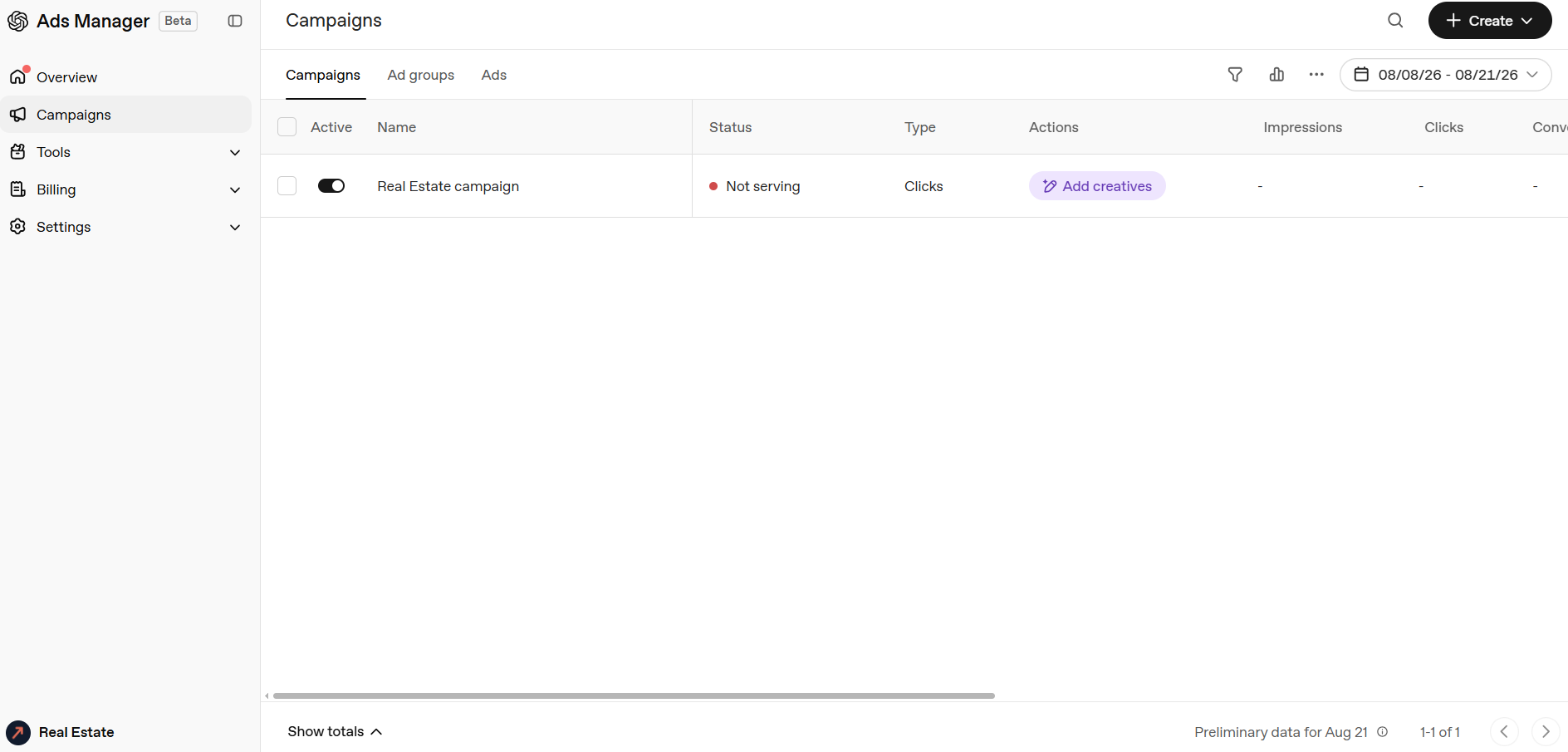
A note on the screenshots in this article: they are the live Ads Manager interface, taken from a real account. The names in them are deliberately generic, "Real Estate campaign" and "Ad group 1", and the budget figure and the example ad are placeholders rather than anything I am running. Your own account will carry your agency name and logo from the onboarding step, and your budget should come from your own numbers rather than mine. Everything below is about how the fields behave, not what to type into them.
A naming convention pays for itself by the third campaign. Something like ES-Costa del Sol | Buyers | UK+IE | Clicks tells you market, audience, geography and objective at a glance in the reporting table.
Campaign settings
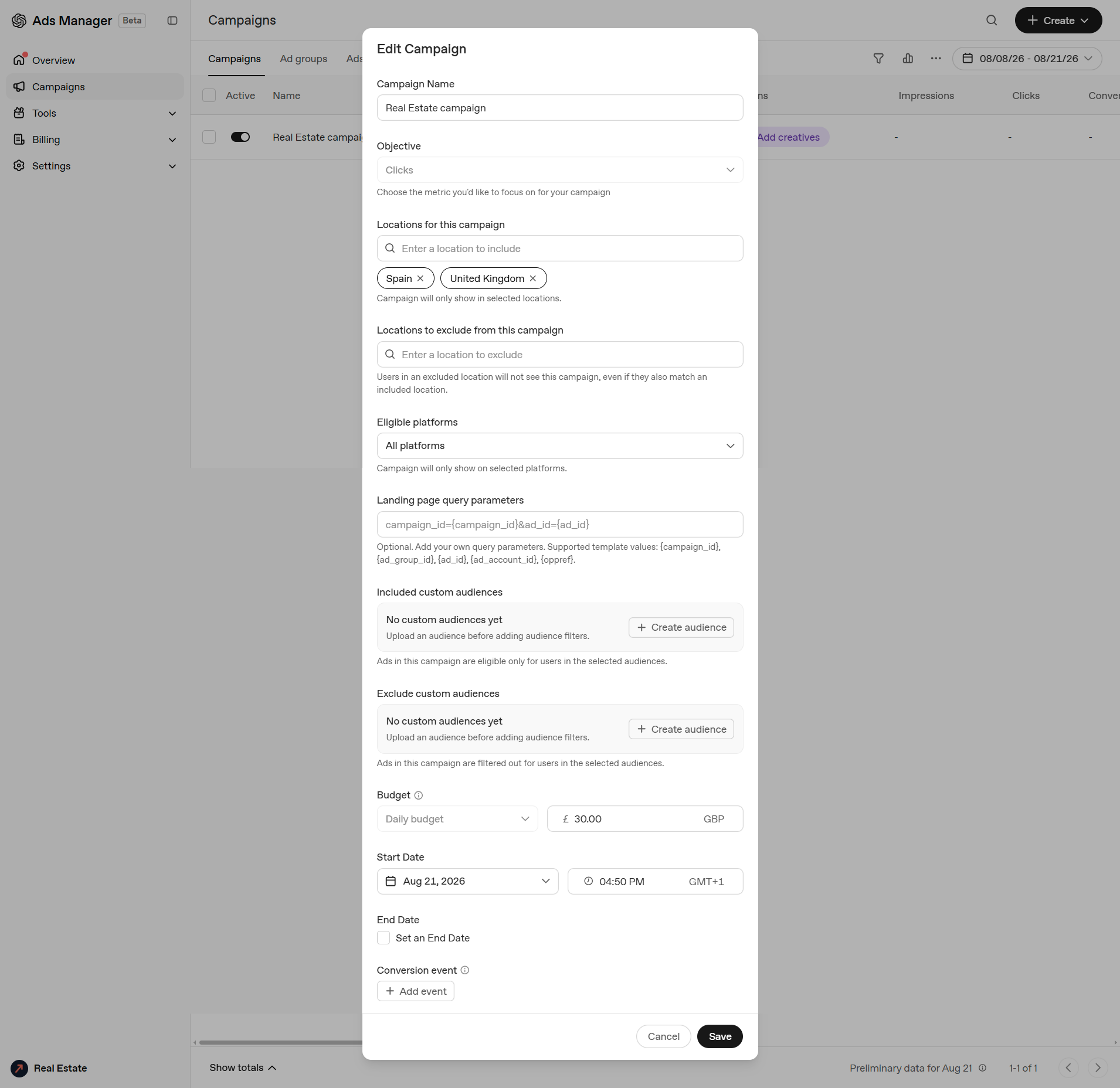
Objective. Clicks, CPM or conversion-optimised CPC. Start on Clicks. You will not have enough conversion volume for the optimised option to learn anything useful in month one, and CPM buying only makes sense if you are running a brand campaign with a defined reach target.
Locations. This is where the buyer is sitting, not where the property is. That distinction catches people out. A Costa del Sol agency should be targeting the UK, Ireland, the Netherlands, Belgium, Germany and the Nordics, plus Spain for buyers already resident. The screenshot has Spain and the UK selected. If your book is 70% British buyers, weight your budget accordingly and consider splitting the UK into its own campaign so it does not compete for budget with markets that convert more slowly.
Targeting is not limited to whole countries. Region and postcode level are both available, and that matters more in this sector than in most. Targeting "the UK" buys you the whole country, while the buyers who actually purchase on the Costa del Sol cluster into a comparatively small number of affluent postcodes. Start at country level to gather data, then tighten to the regions and postcodes that produce enquiries.
Eligible platforms. iOS app, Android app and web. Leave it on all platforms to start. Once you have a few hundred clicks, check whether app traffic behaves differently, because mobile conversations tend to be earlier stage and the enquiry rate usually reflects that.
Landing page query parameters. Set these at campaign level so ad groups and ads inherit them. Two things are worth separating here, because they get conflated.
First, what the platform gives you. The supported template values are {campaign_id}, {ad_group_id}, {ad_id}, {ad_account_id} and {oppref}. Those are the only dynamic macros available, they return IDs rather than names, and {oppref} is OpenAI's own click identifier, which arrives on the URL as oppref= whether you add it or not.
Second, what already happens without you. ChatGPT has been appending utm_source=chatgpt.com to links in its answers since mid-2025, so a proportion of your inbound traffic is already tagged that way before you spend anything. If you set utm_source=chatgpt on your ads as well, paid and organic land in the same bucket in GA4 and you lose the ability to tell them apart, which is the one thing you most need to know.
So build the string from the template values and use a source label that is unmistakably paid:
utm_source=chatgpt-ads&utm_medium=cpc&utm_campaign={campaign_id}&utm_content={ad_id}The source and medium values there are static text you are choosing, not platform macros. Whatever you settle on, run a live test click before launch and look at what actually reaches your server, because single-page apps and redirect rules are the usual culprits for dropped query strings. Getting this right before the first pound is spent saves a long argument later about whether the channel worked.
Custom audiences. Upload lists to include or exclude. The obvious exclusions for an agency are current vendors, past buyers and anyone already in the CRM at offer stage. There is no point paying to reach people you are already talking to.
Budget. Daily or lifetime budget, in your account currency. There is no platform minimum, so the number is entirely yours to work out, and the figure in the screenshot is a placeholder rather than a recommendation.
Work backwards from click cost. Early reported CPCs have sat in the region of $3 to $5, with bids below that finding it hard to deliver at all. Whatever daily figure you land on, divide it by five and that is roughly the clicks you are buying. You want enough volume that two weeks produces a readable pattern rather than noise, which for most agencies means a few hundred pounds across the test rather than a few dozen. Start deliberately small, prove the enquiry cost, then scale. Going in heavy on a beta platform with no conversion history behind it is how budget gets spent before you have learned anything from it.
Conversion event. Add one, through the pixel or the Conversions API. For an agency the event that matters is a valuation request or a viewing enquiry. A property detail page view is tempting because the volume looks healthier, but it will pull the system towards browsers rather than buyers.
Ad groups and context hints
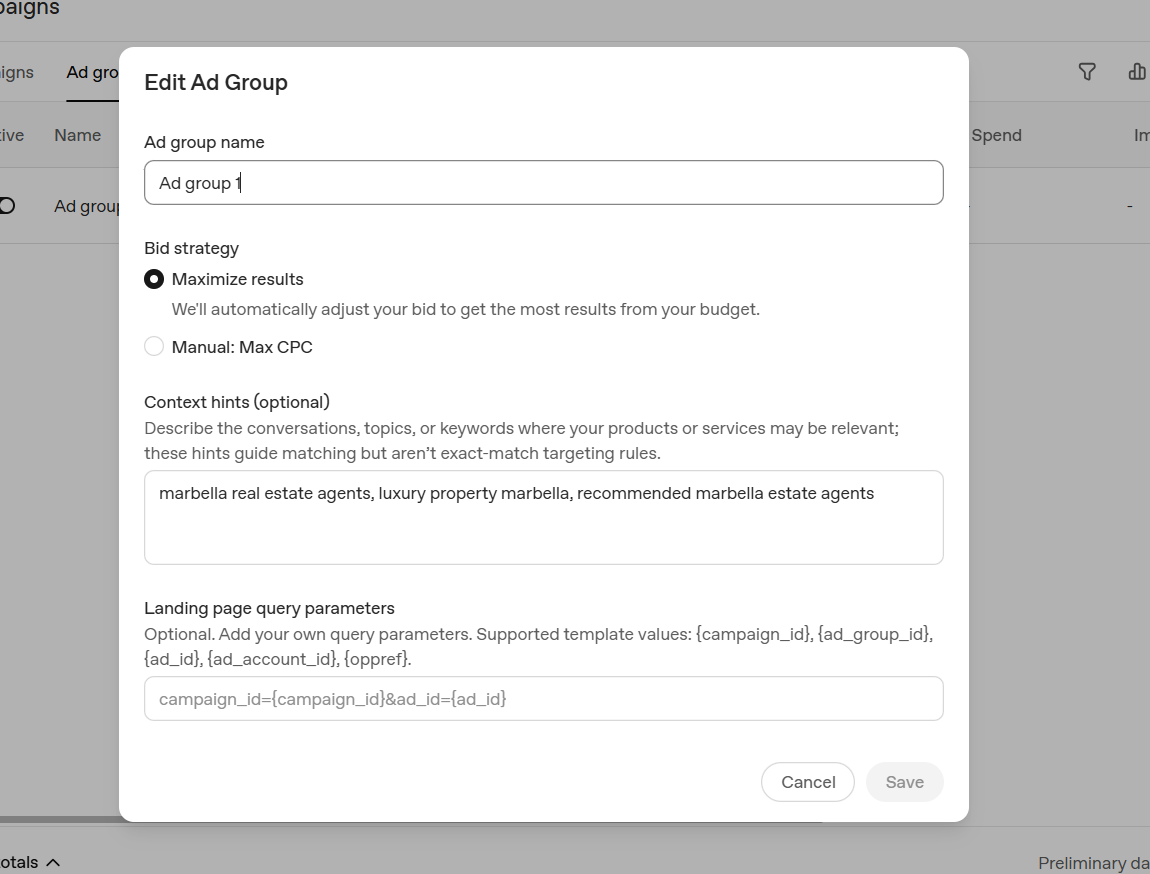
Bid strategy. Maximize results lets the system adjust bids inside your budget. Manual: Max CPC gives you a ceiling. Start on Maximize results while you have no conversion history, then move to manual once you know what an enquiry is worth to you and can work backwards from your close rate.
Context hints. This is the field that does the most work in the whole account. The interface is explicit that hints guide matching and are not exact-match targeting rules, and OpenAI weighs them alongside your ad copy and landing page against the live conversation. You are describing the conversations you want to sit next to.
The example in the screenshot is a basic one: marbella real estate agents, luxury property marbella, recommended marbella estate agents. Three short phrases, keyword-shaped, which is the natural instinct coming from Google Ads. It will work, and it is a fine place to begin.
There is more available if you use the space to describe the situation the buyer is in rather than the phrase they might type. Compare it with:
People researching buying a second home on the Costa del Sol, comparing Marbella with Estepona and Sotogrande, asking which estate agent to use in Marbella, asking about purchase costs, NIE numbers and the notary process for buying property in Spain, British and Irish buyers relocating to southern Spain.
Longer, situational, written the way you would describe the conversation to a colleague. Since the system is interpreting rather than matching, that gives it considerably more to work with.
Split your ad groups by buyer situation rather than by keyword theme. Three or four is plenty on a starter budget:
- Relocation buyers, families, schools and residency
- Second home and holiday buyers
- Off-plan and new build investment
- Vendors looking for a valuation
Each gets its own hints, its own creative and its own landing page. Run more than four on a small budget and you starve all of them.
Writing the ad
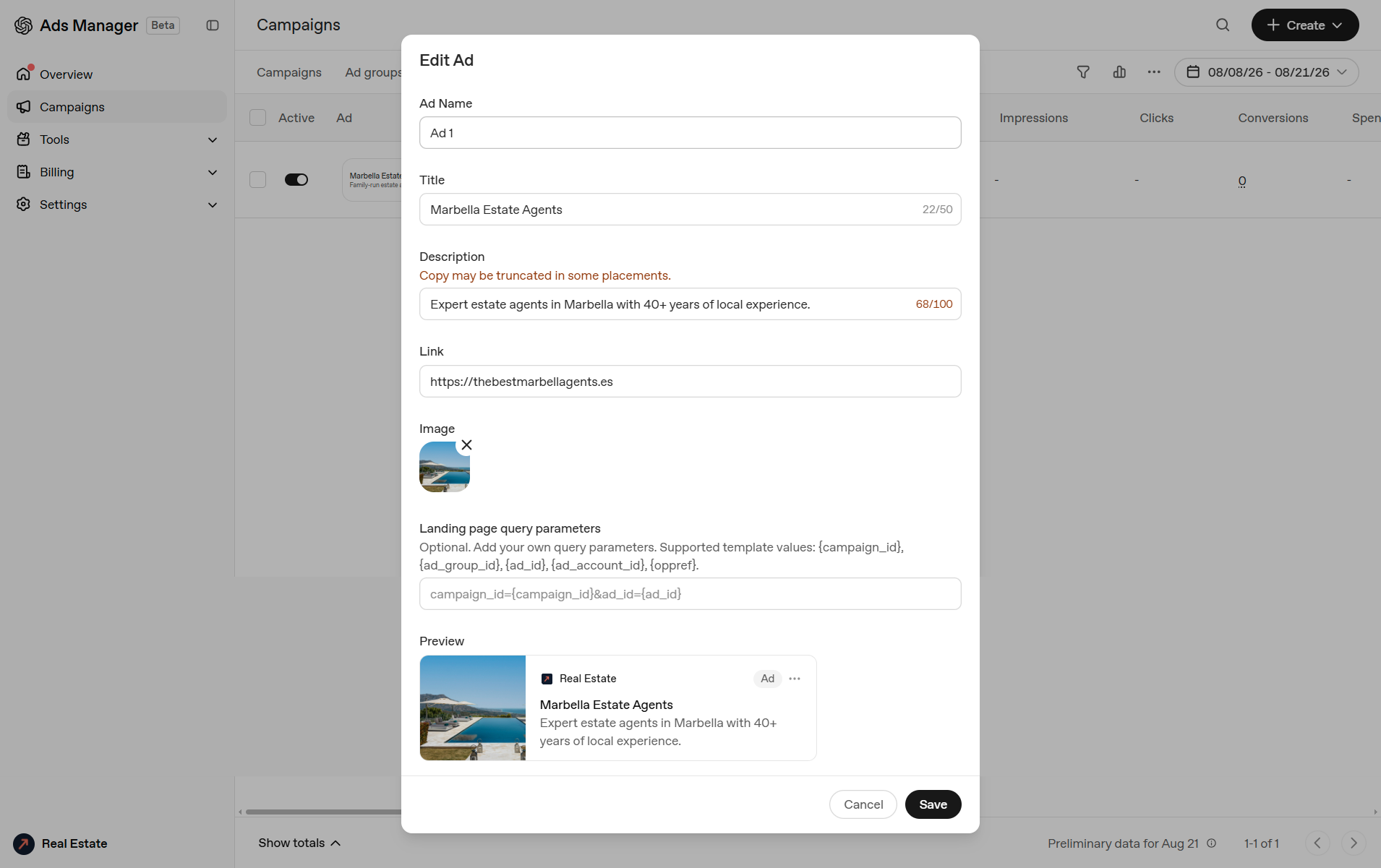
You get 50 characters of title, 100 characters of description, one image and one link.
The interface warns that copy may be truncated in some placements, and in the example that warning is showing on a 68-character description. Treat the limits as generous rather than as targets. Write the first 40 characters so they stand alone.
The preview pulls the advertiser name and favicon straight from the ad account, which is why the card in the screenshot reads "Real Estate". In a live account those come from the business name and logo you entered at onboarding, and they carry real brand weight on the card, so it is worth going back into account settings to check both look right before you push anything live.
On creative:
- Landscape image, one clear subject, no text overlay. It renders small. A terrace with a sea view will outperform a floor plan, a logo or a collage every time.
- Answer the next question rather than shouting. Somebody who has just asked which agencies operate in Marbella does not need "Luxury Villas For Sale". They need the reason to pick you: years on the ground, size of the book, whether you handle the legal side.
- Send the click to a page that continues the conversation. A homepage makes the visitor start again, which is where most of the value in the click leaks away. If the ad group is relocation buyers, the landing page should be your relocation guide with an enquiry form on it.
Every ad goes through review before it serves, so expect the status column to sit at Not serving for a while after you save. That is normal.
Measuring it properly
UTMs plus the pixel plus the Conversions API. All three, because none of them alone survives contact with a real estate sales cycle.
Judge the channel on cost per qualified enquiry, not click-through rate. And set a long attribution window. Someone who clicks a ChatGPT card in August and books a viewing trip in November will show up in your CRM as direct or as a branded search unless you tagged them at first touch and carried that tag through to the record. Get your CRM writing the source on the contact, not just on the deal.
Ads Manager gives you impressions, clicks, spend and conversions by campaign, ad group and ad, with CSV export. Do not expect a search terms report. It does not exist, and that is the largest single gap between this and Google Ads today.
A sensible first month
Week one. One campaign, two ad groups, two ads in each, your starting daily budget, Clicks objective, pixel firing before launch. Confirm the ads have cleared review and are actually serving.
Week two. Leave it alone. Delivery in the beta is uneven, and four days of data will not tell you anything you can act on.
Week three. Cut the ad group that has not delivered clicks. Rewrite the weakest ad. Expand the hints on whatever did work, using the language of the situation rather than more keyword variants.
Week four. Count enquiries, not clicks. If the cost per qualified enquiry beats your Google Ads number, double the daily budget and run another month. If you have clicks and no enquiries, look at the landing page before you blame the channel. If you have neither, park it and revisit in a quarter, because the platform is changing monthly.
Why this is a stop gap
Here is the part that matters more than any of the setup above.
The ad sits below the answer. The answer is where the recommendation lives. When a buyer asks ChatGPT which estate agent to use in Marbella and the model names three agencies, that is the outcome worth having, and no amount of ad spend buys it. Those names come from what the model can find and corroborate across the open web: your site structure and how readable it is to a crawler, your press coverage, your reviews, your presence in directories and third-party listings, whether your business details are consistent everywhere they appear, whether your content answers the questions buyers actually ask in the words they ask them.
You rent the ad slot. You own the citation. The ad disappears the day the card expires.
There is a second reason the paid route cannot be the whole plan, and for luxury property it is the sharper one. Ads only serve to Free and Go users. Plus, Pro and Enterprise subscribers never see them. Anyone paying £20 a month for a better model is, on average, exactly the demographic buying a €2m villa. The buyers you most want are structurally unreachable by advertising on this platform. Organic visibility is the only route to them.
So run both, in sequence. Ads buy you presence in the surface today while the citation work builds, and the ad data doubles as research: the context hints that deliver clicks tell you which conversations your buyers are actually having, and those become your content brief for the next six months. The organic work, digital PR, entity consistency, structured data, feeds the models can read, content built around real buyer questions, takes three to six months to show and then compounds. Starting it in six months means starting six months late, by which point every agency on your stretch of coast will have worked out the same thing.
Talk to us
Propelos builds AI-native websites and AI search for estate agencies, and we run GEO and AEO programmes for real estate agencies to get agencies named inside AI answers rather than advertised alongside them.
If you want a view of where you currently stand, we will run a free AI visibility audit on your agency: which prompts your competitors appear for, where you are being cited and where you are absent, and what needs fixing first. No charge for the audit.
Get in touch and tell us which market you sell into.